
Podcast recording decisions
Should You Restore a Noisy Podcast Recording or Record It Again?
A guide to choosing between an existing podcast performance, a replacement passage and a new take.
Save-versus-rerecord decision
Checks before replacing a podcast take
- Keep the original podcast tracks and check the backups actually available.
- Use a difficult passage to assess processing before approving the whole episode.
- Compare the effort and editorial consequences of a new take with a trial on the existing audio.
Choose whether to save or replace this podcast take
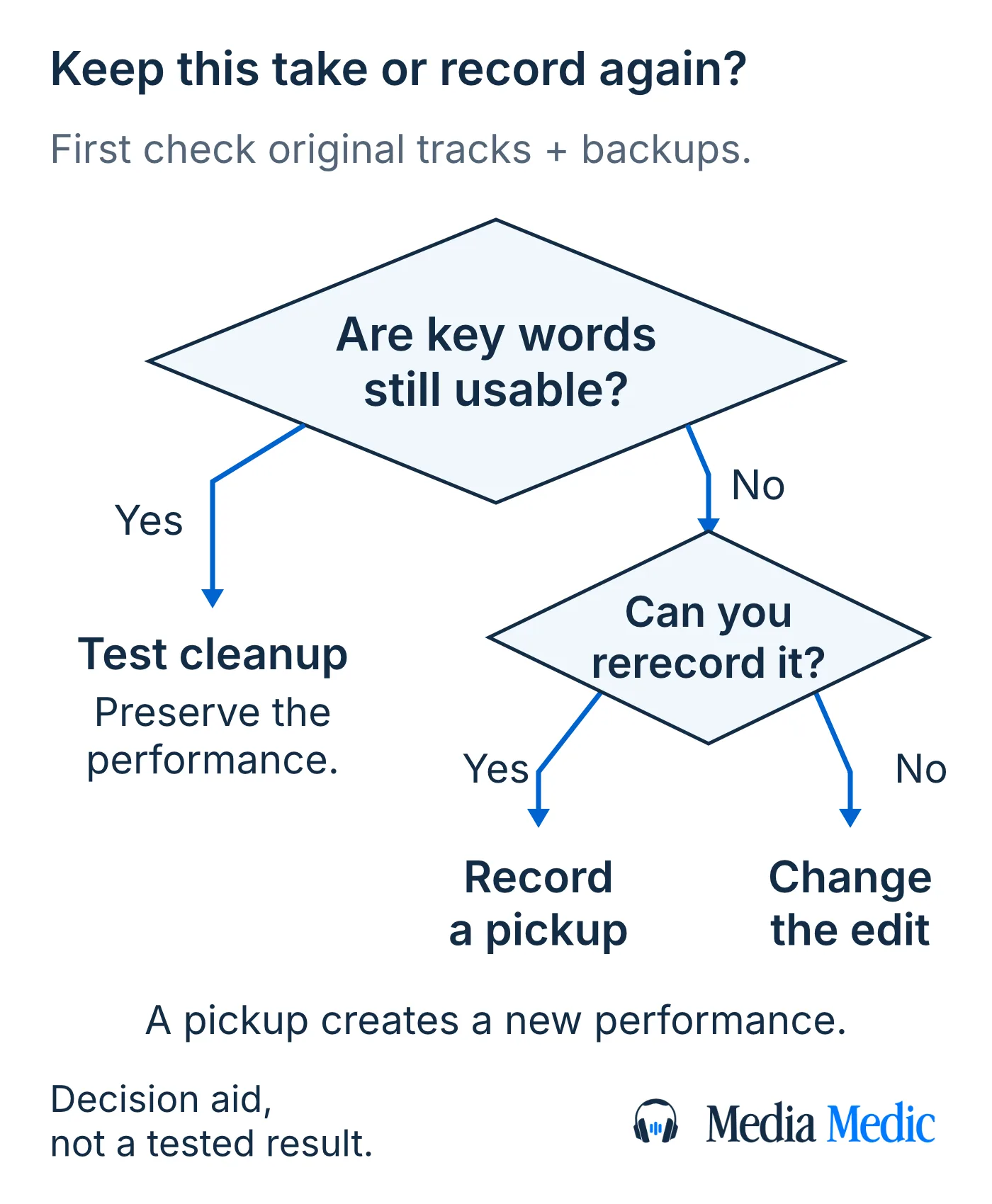
Try restoring a noisy podcast when the recorded speech is still usable and the original performance matters; record a new take when essential words remain unclear and you can improve the recording conditions. You can also replace one passage instead of remaking an entire episode. Restoration processes captured audio, while a rerecord creates a new performance: the best choice must preserve both what listeners can understand and what the episode is meant to convey.

Check the podcast source before deciding to rerecord
Check the original podcast tracks and any backup before judging an episode from its exported mix—the saved file that combines the episode’s tracks. A clearer existing source can remove the need for either extensive processing or a new performance.
Look for recordings you actually have:
- Each participant's separate microphone track, before music and processing were added.
- A local recording saved on the participant's device or by the recording platform, rather than only the sound transmitted during the call.
- A recorder or camera backup covering the same conversation.
- An earlier unprocessed export if the available version has already been cleaned.
Compare the same difficult sentence across the available files. A local track may avoid an internet transmission fault, but it can still contain the microphone's room noise or distortion. Separate tracks are useful only if their contents are useful; a stereo file has two audio channels, but does not necessarily contain one speaker on each channel. Keep the originals unchanged and make working copies for testing.
When is podcast restoration worth a trial?
A podcast restoration trial—a short test of processing existing audio—is worthwhile when the important speech survives in the source and reducing the distraction could make that speech comfortable to follow. The case is stronger when a spontaneous answer, laugh or exchange would lose something if performed again.
Steady background noise and damaged speech need different expectations. Audacity's Noise Reduction, for example, is designed for relatively constant noise and needs a noise-only sample; loud or changing interference can limit the result. Reducing more noise can also remove voice detail. A quiet background alone is not a successful repair.
Clipping—distortion caused when the recorded signal exceeds a limit—is a separate fault. Audacity's Clip Fix attempts to estimate clipped signal and is documented as most suitable for light clipping. Harsh audio deserves a source-specific test, rather than an automatic promise of recovery or an automatic rejection. If the speech remains unusable, the value of the original performance does not make it recoverable.
When should you rerecord part or all of a podcast?
Rerecord a replaceable podcast passage when the important words remain hard to follow and you can correct the cause for a fresh take. Consider a complete rerecord when the same defect affects most of a repeatable episode, or when many small replacements would break its flow.
A scripted introduction and an unrehearsed guest reaction have different replacement costs in editorial terms. The introduction can be performed again; the reaction belongs to the original conversation. Decide what must remain an original recording before choosing how much to replace. A pickup is a newly recorded replacement passage, not a repair to the old take.
Improve the capture conditions before committing to a redo. Address the actual distraction, choose a quieter space where possible, and check for noisy clothing and notifications. Record and play back a short test with the intended setup. Repeating the same fault only produces another recording to assess. Compare the real effort of arranging, recording, editing and checking a new take with the proposed processing of the existing audio; there is no reliable universal time or price break-even point.
Podcast restoration, pickup or rerecord: a decision table
Choose a podcast restoration trial, a pickup or a full rerecord according to the damaged passage and the performance you can replace. Restoration processes existing audio, while a pickup supplies a newly recorded replacement passage; the scenarios are a practical decision aid, not a prediction of repair success.
| Situation in the saved episode | Useful next action | What must be checked |
|---|---|---|
| A fan distracts from an otherwise clear, unique guest answer | Try a short restoration sample | The answer stays clear and the voice does not deteriorate |
| One scripted introduction has an unusable interruption | Record an introduction pickup | The new voice and background fit the transition |
| Most of a repeatable solo episode is difficult to follow | Test a better recording setup, then consider a full rerecord | The new take fixes the source problem before the full session |
| A word is absent in the main file but present in a backup | Compare and edit from the backup | The backup contains the same moment and preserves timing and meaning |
| An irreplaceable guest answer remains uncertain in every source | Consider a shorter supported excerpt, an explained omission or a different episode structure | The edit does not imply the guest said words the recording cannot establish |
How to compare a podcast restoration trial with the original
Compare a podcast restoration trial—a short test of processing existing audio—with the same original passage at similar comfortable playback levels. Judge intelligibility: how easily you understand the recorded words. Use a trial that includes the hardest useful speech, not just a clean pause that makes noise removal sound impressive.
- Keep the original untouched. Make a working copy and identify the exact source and timestamps, including enough surrounding conversation to judge the passage.
- Include a difficult phrase, quieter speech and a transition between speakers or takes where available. A sample from one recording condition does not represent every part of the episode.
- Test one suitable treatment at a time. If using Audacity Noise Reduction, its noise profile—the sample used to identify unwanted noise—must contain noise alone. Do not use a quiet syllable as the noise sample.
- Switch between the original and trial. Check the actual words, natural voice and sentence endings as well as the background. If the processor offers a removed-sound preview, listen for recorded speech being discarded.
- Write down the result: usable for this passage, improved but still limited, or worse than the source. Stop increasing treatment when the words become harder to follow or new unnatural textures distract from the conversation.
A useful sample supports a decision about that sample. Check other difficult moments before approving the same processing across the episode. If a key word still requires guessing, keep the uncertainty in the decision rather than allowing a transcript suggestion to settle it.
How to record a podcast pickup that fits the episode
Record a podcast pickup—a new replacement passage—with enough surrounding speech to match the episode's delivery, then listen across both edit boundaries. A clean sentence can still be a poor replacement if the speaker's tone, pace or background changes abruptly.
- Listen to the original passage and its surrounding conversation. Decide whether a whole sentence or thought will fit more naturally than an isolated replacement word.
- Reuse the microphone, position and room when practical, while correcting the fault that made the first take unusable. Match the speaker's distance, delivery and energy by listening to a short test; matching equipment alone does not guarantee a match.
- Record some quiet background with nobody speaking. This room tone is the sound of the recording environment, and can help an editor avoid an abrupt change to empty silence at a join. It cannot replace missing dialogue.
- Put the new passage into a copy of the episode edit. Listen from the original speech through the pickup and back into the original, checking breaths, sentence rhythm and the background at both joins.
If a brief pickup sounds conspicuously different, try a longer natural passage or use an identifiable new narration segment. Do not keep processing the old conversation solely to force it to sound like the replacement.
What if an interview guest cannot rerecord?
When a podcast guest cannot return, preserve usable original speech and reconsider the edit instead of manufacturing a clean version of an uncertain answer. Processing the existing recording may still merit a limited trial, but an unavailable guest does not change what the source contains.
You may be able to use a shorter intact excerpt, omit a damaged exchange without changing the guest's meaning, or record host narration that clearly explains the gap. A host summary must be supported by the reporting; it is not a quotation or evidence that the missing words were spoken. Keep the original question and answer available to the person approving the edit.
If a guest later supplies a clarification or replacement answer, identify it in the production record and consider what the audience needs to know about when it was recorded. Follow the episode's editorial standards, especially for journalism or factual reporting. A smoother listening experience is not permission to present a new statement as an unrehearsed original response.
Can AI fix a podcast without creating a new performance?
Artificial intelligence (AI) features can process existing podcast speech, but an “AI repair” label alone does not establish whether the feature suppresses noise or generates replacement speech. A tool that generates a new voice passage creates audio that was not captured in that performance; a smoother result does not make that audio part of the original take.
Check the exact feature and compare the result with the original, including important words and quiet syllables. Processing can change speech detail even when the intention is noise suppression. Some regeneration features rebuild an edit using surrounding speech, while others can generate changed words. Neither function establishes an uncertain word in the original recording. For a guest interview, do not treat a plausible generated answer as recovered speech.
For your own scripted narration, an authorized generated replacement may be an editorial option under your production's rules. Label its origin in the project and check the result in context. Technical smoothness, permission to use a voice and the accuracy of the statement are separate questions; an assessment of processing the original file does not answer all three.
Check the podcast edit before approving the episode
Approve the repaired or rerecorded podcast only after listening to the complete export—the saved episode file produced from the edit—including the boundaries around every replacement. A successful short sample does not establish that the finished edit works throughout.
- Confirm that important words and speaker changes remain understandable, including passages outside the test sample.
- Listen for abrupt changes in room sound, word endings cut short at edits, repeated words or missing breaths.
- Check new narration and guest replacements against the intended meaning, and retain a record of their origin.
- For a video podcast, check the changed passages against lip movement and update affected captions or transcript text.
- Keep the approved export, source files and edit project identifiable and separate.
If only one passage still fails, revisit that passage's editorial role before restarting treatment on the whole episode. Publishing requirements and final loudness are separate production checks; source cleanup alone does not certify a finished delivery.
What this podcast decision guide can establish
This podcast decision guide provides a way to choose between testing audio processing, recording a replacement and changing an episode's edit. Its decision rules combine published processing guidance with editorial judgment; no recording was supplied or tested for this article.
No universal repair time, price, success rate or guaranteed recovery follows from these examples. A particular file may support a useful improvement, a limited compromise or no usable repair. The decision depends on the captured speech, the repeatability of the performance and the intended episode.
Request a review of the podcast passage you need to save
A file review can help you decide whether processing the existing audio in a podcast passage is worth pursuing. Media Medic offers a free file review; restoration work is paid, and improvement depends on the recording.
When requesting a review, identify the original file, the difficult timestamps, any separate tracks or backups, and whether you can record a replacement. Explain whether you need to preserve a spontaneous guest answer, replace a scripted section or assess the whole episode. Include what processing has already been tried and any sharing restrictions that need discussing before you send material.
A short do-it-yourself cleanup trial may be enough if you can compare a working copy with the original and the speech already meets your listening goal. Set a limit on the time you can spend testing. If the important passage still fails that comparison or you need help judging the tradeoff, request a file-specific review before committing to paid cleanup.
List any production work you also need: editorial cuts, music, mixing (combining the tracks) or mastering (preparing the final audio for delivery). Ask which tasks and return files the quote covers; do not assume they come with restoration. Use the production audio handoff guide to prepare that separate agreement.
Request a podcast file review with the listening goal and the decision you need to make. The review does not promise recovery of every word.
Sources for podcast restoration and rerecording decisions
- Audacity: Noise Reduction https://manual.audacityteam.org/man/noise_reduction.html
- Audacity: Clip Fix https://manual.audacityteam.org/man/clip_fix.html
- AP: Telling the Story https://www.ap.org/about/news-values-and-principles/telling-the-story/
- University of Minnesota: podcast interview audio https://umarcomm.umn.edu/blog/2024/10/14/tips-good-audio-quality-radio-and-podcast-interviews
- Riverside: high-quality tracks https://support.riverside.com/hc/en-us/articles/5260109014045-About-high-quality-tracks
- iZotope: room tone in audio editing https://www.izotope.com/community/blog/basics-of-room-tone-audio-editing
- Descript: Regenerate https://help.descript.com/script-editing/fix-take