
Recording guide
Can TV sound be removed from a voice recording?
TV sound can sometimes be reduced in a voice recording, but overlapping TV dialogue may remain and processing can damage wanted speech.
TV interference
Limits of TV sound removal from voice recordings
- TV sound can sometimes be reduced, but complete removal while preserving all wanted speech is not guaranteed.
- TV dialogue can overlap the wanted speech, so a general noise reducer may keep both speakers.
- Processing can damage quiet words or word endings; a cleaner background alone does not establish success.
What TV sound removal means for an existing voice recording
TV sound removal for an existing voice recording means processing the television sound captured with the wanted speech. Turning down a television or changing its playback settings cannot undo sound already present in the file.
The wanted speaker is the person you need to understand; wanted speech means that person’s recorded speech. TV dialogue is the speech coming from the television.
The illustration shows wanted speech and TV dialogue entering the same recorder. The colored sound ribbons explain this mixture; they are not measured audio or a before-and-after result.
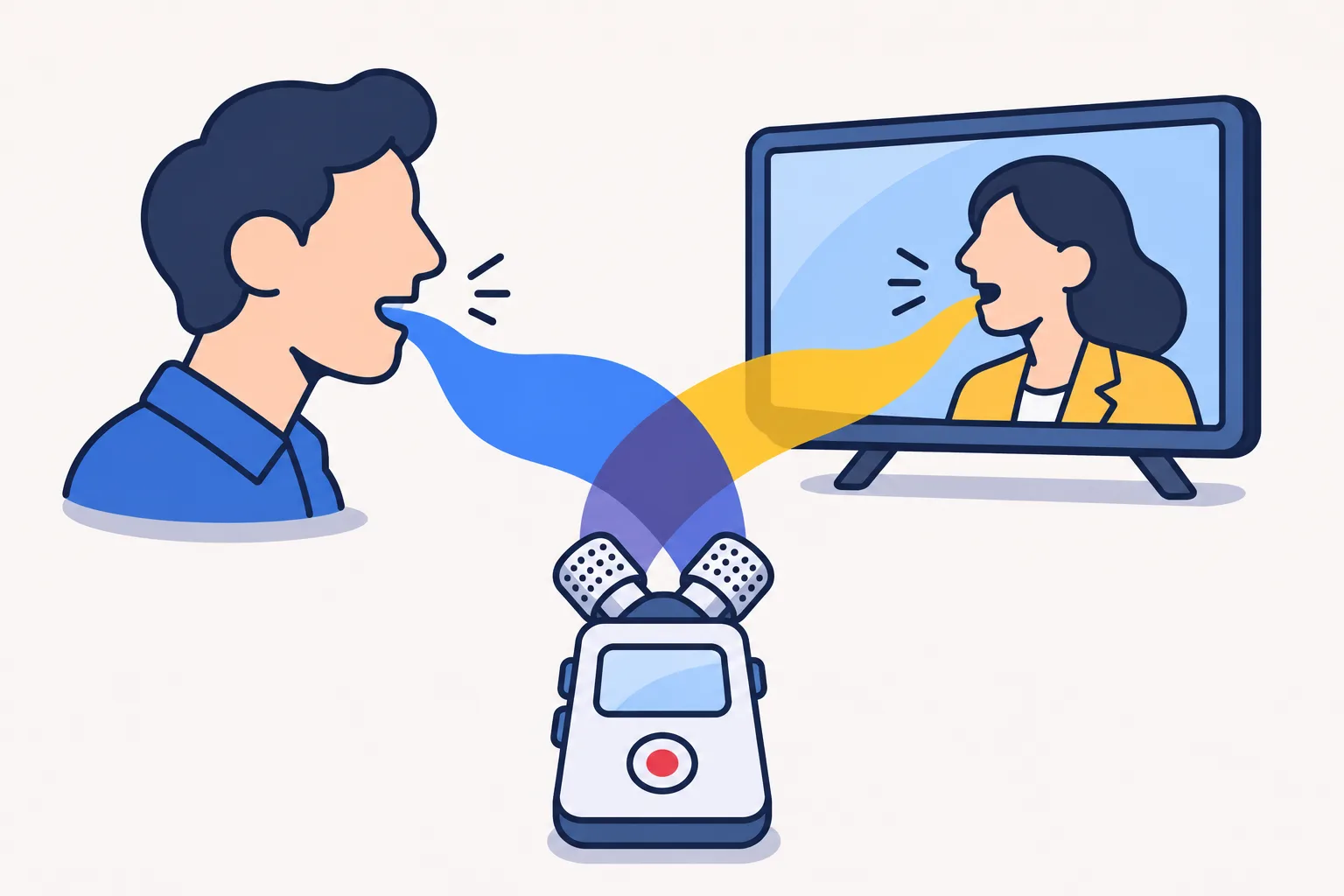
Why TV dialogue is difficult to remove from recorded speech
TV dialogue and the wanted speech are both speech. When a microphone captures them together, a general speech enhancer cannot be assumed to know which speaker matters to you.
Speaker separation means estimating individual voices from a mixture. That is a different task from reducing a fan's hum or making every voice sound clearer.
Overlapping speech does not make improvement impossible. It does mean that a successful result must be demonstrated on your recording, rather than inferred from a tool's noise-removal label.
Check the original recording before trying TV noise removal
Keep the original TV-contaminated recording unchanged and make a separate working copy for processing. The original recording preserves the captured audio; the working copy is the file you can safely change during a test.
Retain the full unedited file even when you use a short test excerpt. Keep a note of the processing applied to each listening copy so the changes remain distinguishable from the original recording.
Check stereo channels for a clearer voice before removing TV sound
A stereo recording has left and right audio channels, and one channel may offer a clearer balance between the wanted speech and the television. Listen to each channel separately before combining them.
If the wanted speech is clearer on one side, use a copy of that channel for a listening test. Do not assume that splitting stereo creates separate speakers: each channel may still contain the entire mixture.
Preserve the original stereo file even if a single-channel listening copy is more useful. If both channels contain the same audio, splitting them will not uncover an independent voice track.
How to identify TV interference in a voice recording
Identify TV interference by listening for a steady hum, music or sound effects, TV dialogue overlapping the wanted speech, and television sound during pauses. These are different sound patterns even when they occur in the same voice recording.
Listen to a short passage containing both the wanted speaker and the television, then a pause without the wanted speaker. Note whether the interference stays fairly constant or changes with the television program. This identifies the problem to test; it does not establish that removal will succeed.
TV interference in voice recordings: processing tests and limits
For TV interference in a voice recording, steady hum calls for a noise-reduction test; music or effects call for a speech-isolation test; overlapping TV dialogue calls for an individual-speaker separation test; and quiet gaps can be tested with gating. Each test has limits.
Speech isolation distinguishes speech from other sound. Speaker separation attempts to divide individual voices. Gating turns down audio below a level threshold.
| TV interference | Useful first test | Main limitation |
|---|---|---|
| A steady hum beneath speech | Gentle hum or noise reduction | Does not isolate changing TV dialogue |
| Music or sound effects around speech | Speech isolation | May alter wanted speech or leave TV dialogue |
| A TV actor speaking over the wanted speaker | Individual-speaker separation | Separation may be incomplete; inspect every output |
| Quiet TV sound between sentences | Gentle gating or local volume reduction | Does not remove TV sound during wanted speech |
Why a TV-only noise profile may not remove the whole program
A TV-only noise profile may help reduce steady interference, but it cannot be assumed to remove a changing television program. A noise profile is a sample of unwanted sound used to guide noise reduction; TV speech, music and sound effects change over time.
Conventional profile-based noise reduction works better on relatively steady noise. It may struggle when the unwanted sound changes rapidly or shares frequencies with the wanted speech.
Can EQ reduce TV dialogue without changing wanted speech?
EQ cannot reliably reduce TV dialogue without also changing wanted speech when both occupy the same frequencies. Equalization, or EQ, raises or lowers selected audio frequencies; it does not select a speaker by identity.
A restrained filter may help with a distinct rumble or narrow tone. Undo an adjustment that makes the wanted speech thin or muffled, even if the television sounds less prominent.
What a noise gate can change in a recording with TV sound
A noise gate turns audio down when its level falls below a threshold. It can quiet low-level television sound during pauses, but it cannot selectively remove the television while the wanted speech opens the gate.
An aggressive gate can also cut quiet words and word endings. Test complete phrases, including their beginnings and endings, rather than judging the effect only during silence.
If the goal is to understand wanted speech, quieter gaps alone are not a successful repair. Keep the wanted speech intelligible even if some TV sound remains.
Can AI separate a TV actor's voice from the wanted speaker?
AI speaker-separation tools can attempt to divide overlapping voices into separate outputs. Their task is different from a general speech enhancer that reduces non-speech background sound.
Check whether the feature actually separates individual speakers, whether it requires a reference voice sample and whether the available controls suit your recording. A reference voice sample is a separate recording of the wanted speaker that a compatible tool uses to help identify that voice; requirements differ between tools. Listen to every separated output: part of the wanted speaker’s sentence may remain in a different track.
A cleaner-sounding result is not proof that every word has been preserved. No audio file was tested for this article, so the amount of improvement possible on your recording remains unverified.
Can Audacity reduce TV noise in a saved voice recording?
Audacity is a free desktop editor whose Noise Reduction effect can reduce steady noise in a saved voice recording. The effect is not an individual-speaker separator, so do not expect it to choose between TV dialogue and wanted speech.
For a conservative Noise Reduction test, work on a copy:
- Select a passage containing only the unwanted steady noise and use Get Noise Profile, which learns a sample of that noise. Do not include the wanted speaker in the sample.
- Select the passage to process, reopen Noise Reduction and preview a low reduction amount. No single setting suits every voice recording.
- Check complete phrases for lost wanted speech. The Residue preview plays the sound that would be removed; reduce the effect or undo it if that preview contains wanted speech.
Can a browser noise remover process a TV-contaminated voice recording?
SoundTools Noise Remover is a free browser-based option for processing a saved voice recording with TV interference. Its noise-cleanup controls do not establish that it can separate TV dialogue from wanted speech.
Preview the wanted speech before keeping a processed copy, and check the downloaded file. Treat a quieter background as a listening result to assess, not proof that overlapping TV dialogue has been removed.
Does live microphone suppression edit TV sound in a saved recording?
Live microphone suppression does not itself edit TV sound already captured in a saved voice recording. It changes a live microphone signal, which is a different task from processing an existing file.
For an existing voice recording, choose a workflow that opens the saved file and produces a processed copy. Check that exported copy rather than treating a cleaner live call as evidence that the saved recording changed.
Can iPhone playback enhancement remove TV sound from a saved recording?
Voice Memos on iPhone offers Enhance Recording to reduce background noise and echo during playback. That option changes playback rather than the recording itself, and its description does not establish that it separates the wanted speaker from a TV actor.
If Enhance Recording is available for the voice recording, compare the same difficult phrase with the option on and off. Keep that listening adjustment separate from producing an edited file: a processed copy for sharing or examination needs a file-editing workflow and an exported-result check.
Can a clean copy of the TV program cancel the recorded television?
A clean TV soundtrack does not automatically cancel television sound captured by a microphone. Polarity cancellation mixes a waveform with an inverted copy to cancel matching sound. It requires matching audio waveforms, not merely the same program.
The loudspeaker, room and microphone change the captured sound. Timing and level differences also matter. Those differences mean that inverting a downloaded soundtrack and placing it against the recording is not a reliable one-click fix.
If you already have the exact program segment, keep it separately and identify it as reference material. Do not overwrite the original recording while experimenting with cancellation.
How to judge wanted speech after TV sound reduction
Judge TV sound removal by whether the wanted speech is easier to understand, not by how silent the background becomes. Compare the same passage at a similar listening volume so that a louder processed copy does not win simply because it is louder.
Before processing, note the words you can understand and mark uncertain words. After processing, listen for complete word beginnings and endings, consistent speaker identity, missing syllables, and watery or metallic sounds. Include quieter wanted speech as well as louder passages.
Reject a setting that quiets the television but makes the wanted speech harder to understand. Keep uncertain words uncertain; a processing artifact or automated transcript does not confirm what the wanted speaker said.
When professional review is useful for TV-contaminated recordings
Professional review is useful when the wanted speech remains unclear, several voices overlap or your processing tests damage the wanted speech. Ask the reviewer to assess the specific passage and explain the remaining limits before you commission further work.
Provide the original file, the relevant timestamps and a description of the wanted speaker. Identify any separate microphone tracks, cleaner channel or reference material you already have.
Ask what the proposed work includes, what result can be evaluated and what remains uncertain. A file-specific assessment is more useful than a promise that television sound can always be removed.
Sources on TV sound and voice-recording cleanup
- Audacity Development Manual, Alternative Noise Reduction Techniques https://manual.audacityteam.org/man/alternative_noise_reduction_techniques.html
- Audacity Development Manual, Noise Reduction https://manual.audacityteam.org/man/noise_reduction.html
- Audacity Development Manual, Splitting and Joining Stereo Tracks https://manual.audacityteam.org/man/splitting_and_joining_stereo_tracks.html
- Audacity Development Manual, Invert https://manual.audacityteam.org/man/invert.html
- Google Research, VoiceFilter; ICASSP 2019 paper record https://research.google/pubs/voicefilter-targeted-voice-separation-by-speaker-conditioned-spectrogram-masking/
- Adobe, About cloud-based AI voice features; page dated September 24, 2026 https://helpx.adobe.com/premiere/desktop/edit-projects/edit-with-generative-ai/about-cloud-based-ai-voice-features.html
- SWGDE, Best Practices for Enhancement of Digital Audio, 20-A-001-2.0 https://www.swgde.org/documents/published-complete-listing/20-a-001-2/
- Audacity Development Manual, Filter Curve EQ https://manual.audacityteam.org/man/filter_curve_eq.html
- Audacity official Noise Reduction feature guide https://www.audacityteam.org/features/noise-reduction/
- Apple Support: Play a recording in Voice Memos on iPhone https://support.apple.com/en-gb/guide/iphone/iphebbd067ce/ios
- SoundTools official Noise Remover page https://soundtools.io/noise-remover/